

A shop loses its wired internet connection, and the payment terminal can no longer reach its service. At a warehouse, cloud inventory and remote access stop working. A mobile backup connection can keep essential traffic online until the primary link returns. Unlike a phone hotspot, a dedicated router applies one connection policy to the site.
The important part is not simply adding a SIM card. The router must detect a real internet failure, switch to a working mobile connection, and return to the preferred link when it recovers. The setup must be tested with the applications the business actually uses.
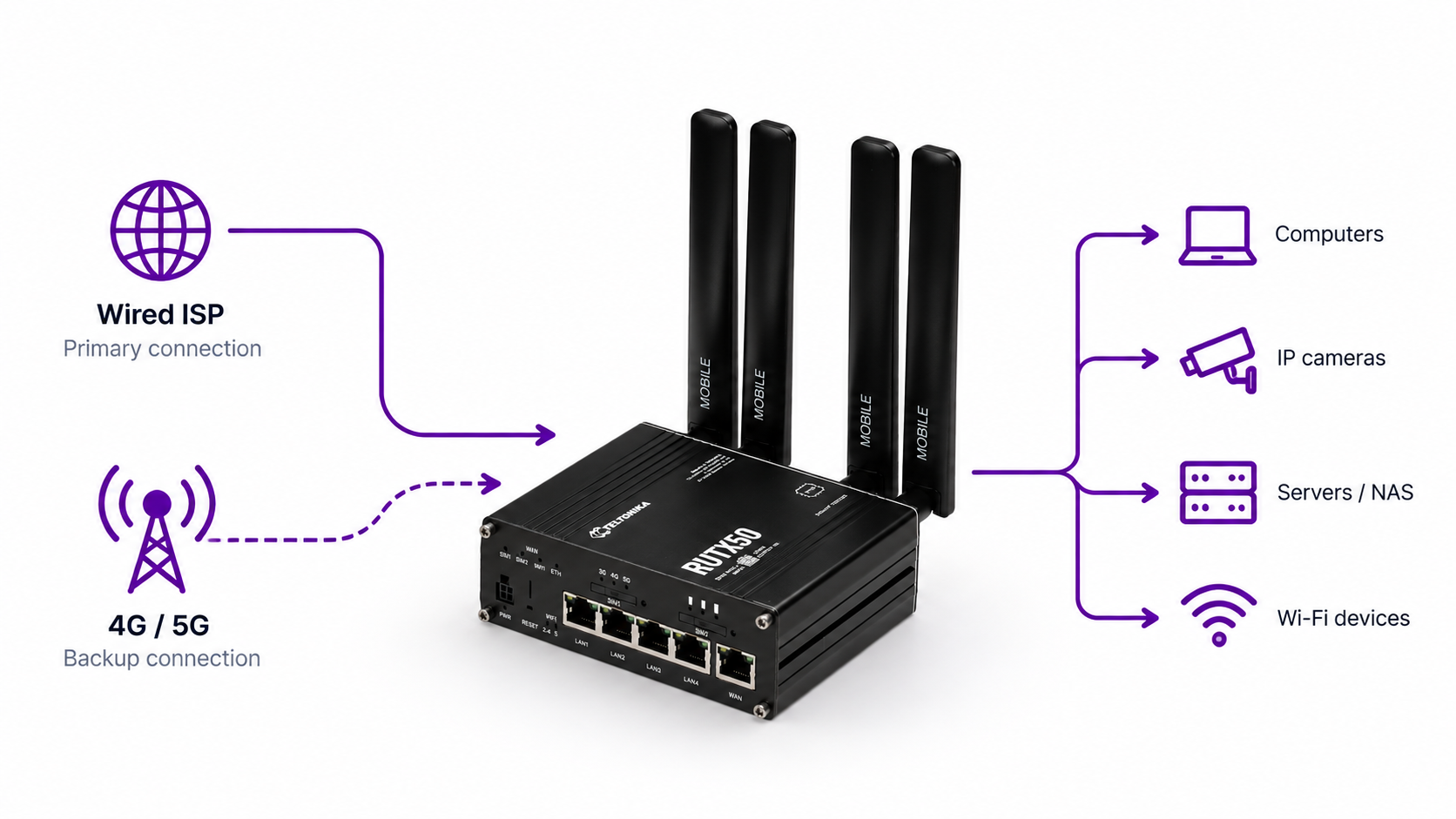
Teltonika RUTX50 with wired internet and 4G/5G backup connectivity
Key Takeaways
Failover should detect loss of internet access, not just a disconnected Ethernet cable.
A stable 4G link may be enough for payments, inventory and remote access; 5G matters when backup traffic is heavier.
Two SIM slots can provide an alternative operator, but do not mean two simultaneous mobile connections.
Test the switch to mobile and back before relying on the setup.
Table of Contents
How Does Cellular Failover Work?
Connect the primary broadband line to the Teltonika router’s wired WAN port and configure its mobile interface as the backup. Devices on the LAN use the same gateway regardless of which internet connection is active.
RutOS can check reachability by sending requests to external hosts. If the preferred connection fails the configured tests, traffic is routed over 4G or 5G. When the primary connection becomes healthy again, it can regain priority. This also covers cases where the ISP modem remains powered but the provider’s internet service has failed.
A connected Ethernet port does not prove the ISP is online: the modem may stay powered while the service upstream fails. Checking a reliable external host is therefore more useful than checking only the local gateway. Use sensible timeouts and failure thresholds so brief packet loss does not trigger unnecessary switching.
Failover is not instant, so brief packet loss is possible.
The public IP usually changes during failover, so a VPN, call or remote-access session may need to reconnect. Incoming connections over mobile data can also be restricted by carrier-grade NAT.
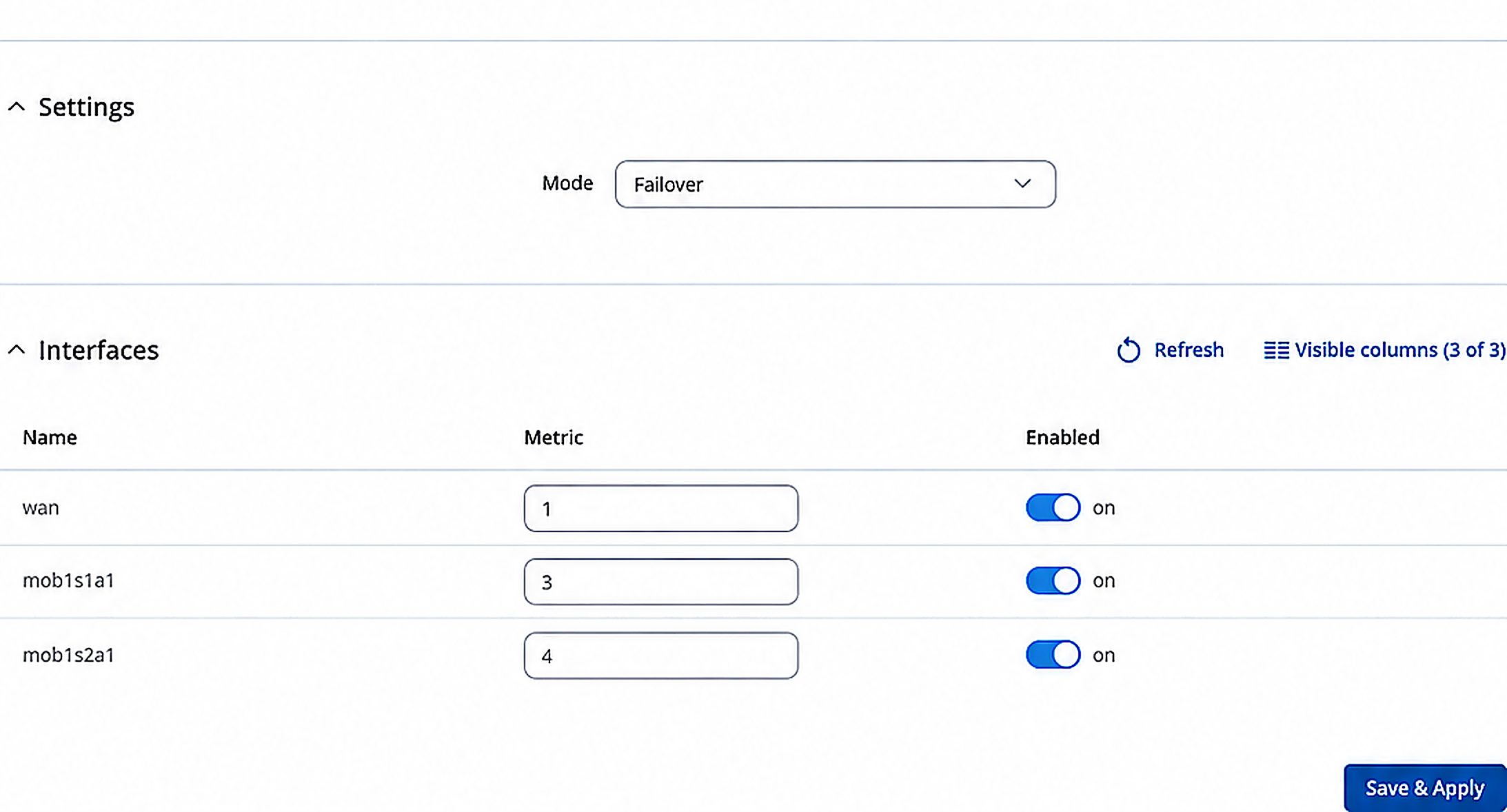
RutOS failover settings: wired WAN primary, mobile WAN backup
What Should You Configure and Test?
- Check both paths separately. Confirm that wired internet works, then verify the SIM, APN and mobile data connection without relying on the wired link.
- Set wired WAN as the preferred connection and mobile WAN as the backup. Configure reachability checks to dependable external targets, with sensible intervals to avoid false switches.
- Test a real outage. Keep a continuous ping running, disconnect the incoming WAN cable, and check whether the payment system, cloud application or remote connection works over mobile data.
- Reconnect the primary line. Confirm that the router returns to it and check whether any application needs to sign in or reconnect.
Also plan mobile data limits, roaming rules and notifications where supported. A backup link that accidentally carries large updates or video uploads can consume a limited SIM plan quickly.
In a live test, note which WAN is active in RutOS and how long traffic takes to recover. A ping test is useful, but also try a real payment, inventory update or remote connection. Document the test result so later configuration changes can be checked against it.
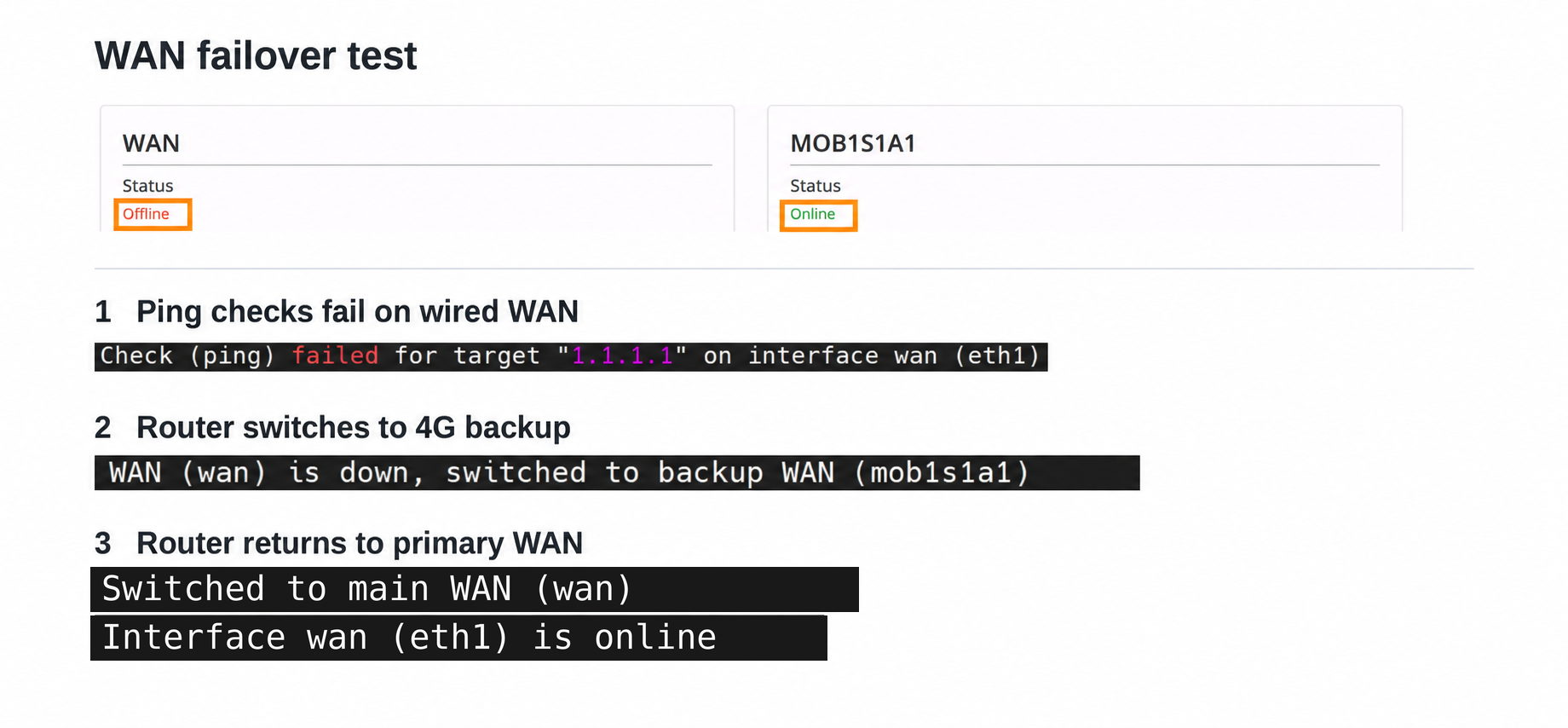
WAN failover: switching to 4G backup and back
Which Teltonika Router Should You Choose?
The main decision is whether you need basic 4G protection, a second mobile operator, or greater bandwidth during an outage.
Before comparing models, estimate how much traffic must continue during an outage. A payment terminal uses very different bandwidth from a site uploading multiple camera streams. Peak mobile speeds are not a substitute for a realistic workload estimate. Note that RUT241 and RUT951 have 100 Mbps Ethernet ports, which can limit a faster wired connection when used as the main gateway. For 200–500 Mbps connections, consider a Gigabit Ethernet router such as RUTX50.
| Model | Mobile backup | Ethernet ports | Practical fit |
| Teltonika RUT241 | 4G LTE, one physical SIM | 1 × WAN + 1 × LAN, 100 Mbps | One small site; essential traffic |
| Teltonika RUT951 | 4G LTE, two SIM slots with switching | 1 × WAN + 3 × LAN, 100 Mbps | Another operator as fallback |
| Teltonika RUTX50 | 5G/4G, two SIM slots with switching | 1 × WAN + 4 × LAN, 1 GbE | Higher-throughput backup |
Is a Second SIM the Same as a Second Active Connection?
No. On the RUT951 and RUTX50, only one SIM card is active at a time. Switching between SIM cards may take approximately 30 seconds to 2 minutes, depending on network conditions. If operator redundancy matters, choose SIMs from different operators and test the switching time at the site.
When Is 5G Worth It?
Choose 5G when multiple users or high-volume applications must keep running during a wired outage. For low-bandwidth tasks, a reliable 4G connection is often a more economical backup. Actual performance depends on the local network, signal and data plan, not the router’s headline speed.
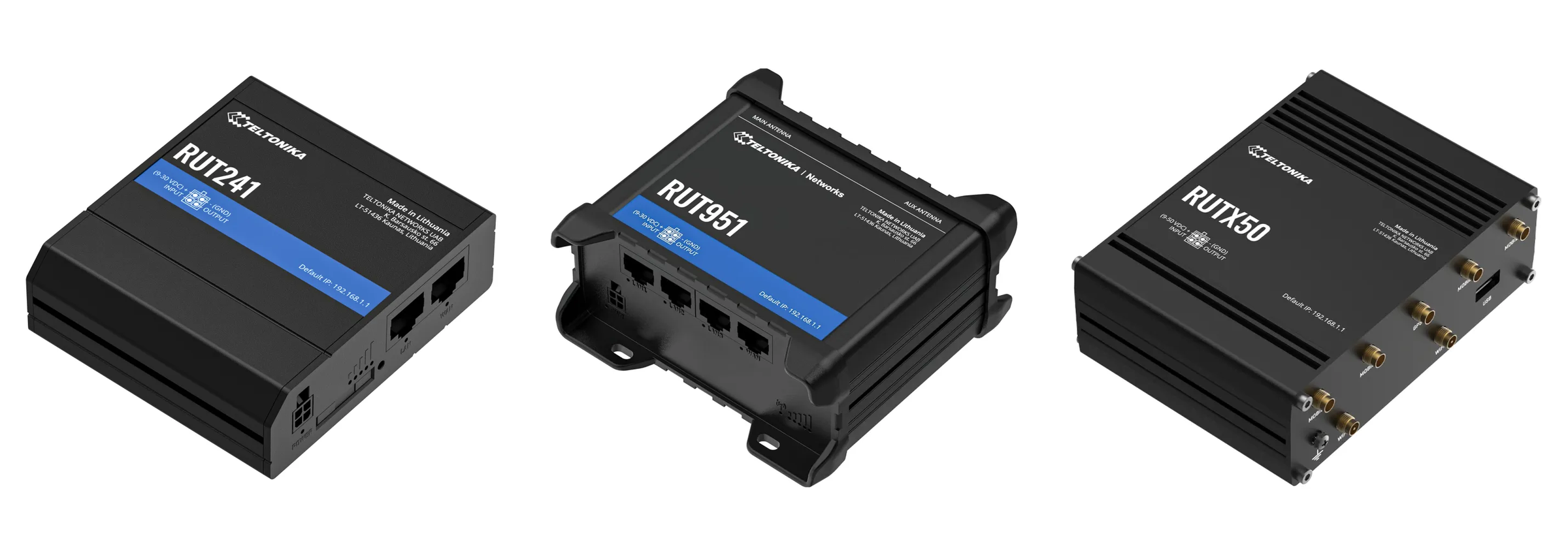
Teltonika RUT241, RUT951 and RUTX50 for 4G/5G backup
Which Metrics Should You Monitor?
A router showing “connected” does not tell you whether the backup can handle real business traffic. Check these indicators under mobile operation:
Measure signal quality at the final installation position. A closed metal cabinet or windowless basement can significantly weaken cellular reception. Consider placing the router outside the enclosure or using compatible external cellular antennas. Check latency and packet loss while normal business traffic is running.
| Metric | What it tells you |
| RSRP and SINR | Cellular signal strength and quality; assess at the installed location. |
| Latency and packet loss | Whether remote systems remain responsive during backup. |
| Mobile data usage | How quickly the SIM plan is being consumed. |
| WAN status and event logs | When links failed, switched and recovered. |
When It Helps — and When It Does Not
When it helps: Shops, warehouses, small offices and remote sites that depend on cloud services, card payments, monitoring or remote access and have adequate mobile coverage.
When it does not: Failover cannot fix poor cellular coverage, restore power during an electricity outage, or guarantee uninterrupted sessions. The router, switch and essential devices may need UPS power.
Conclusion
Start with the workload that must survive an outage. Test mobile coverage, select the required 4G or 5G capacity, configure reliable failure detection, and verify both failover and recovery. A working backup is one that has been tested—not merely enabled.
FAQ
Can the Router Detect an ISP Outage If the Ethernet Link Stays Up?
Yes, if it checks reachability beyond the local gateway rather than relying only on the physical Ethernet link.
Can Fibre or Starlink Be the Primary Connection?
Yes, if the service provides a compatible Ethernet handoff to the router’s WAN port. Mobile data can then act as the fallback.
Does Dual SIM Mean Both Operators Are Active at Once?
No. RUT951 and RUTX50 typically switch between SIMs; they do not aggregate two cellular connections.
Will Backup Internet Work During a Power Cut?
Only while the required equipment has power. A UPS may be necessary, and the mobile network must also remain available.


